

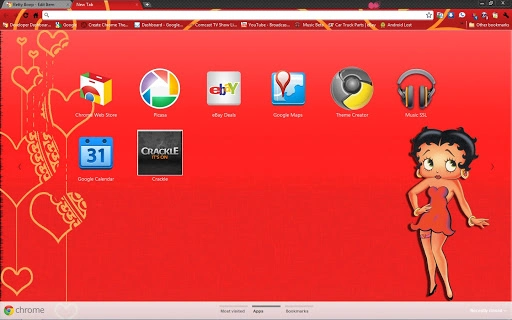
Description
Betty Boop Animated Desktop Theme
Overview
Betty Boop is a nostalgic animated desktop theme inspired by the iconic 1930s and 1940s cartoon character created by Max Fleischer and developed by Fleischer Studios. Designed for fans of vintage animation and retro aesthetics, this software brings classic cartoon charm to modern desktop environments on Windows and Mac platforms. The theme features animated elements, including moving character graphics and stylized interface components that reflect the whimsical spirit of the original Betty Boop shorts. It serves as a visual upgrade for users seeking a unique, playful desktop experience rooted in classic American animation history. The software is intended for casual users and retro enthusiasts who appreciate vintage design and animated content. While the developer did not provide additional background details, the theme aligns with the cultural legacy of Betty Boop as a symbol of early animation innovation. It can be used to personalize personal computers, enhance creative workspaces, or simply evoke a sense of nostalgia for mid-20th-century pop culture.
Key Features & Capabilities
- Animated Desktop Backgrounds – Features dynamic, looping animations of Betty Boop in her classic 1930s style, including her signature bob cut, oversized eyes, and playful expressions. The animation runs smoothly within the desktop environment without requiring external players.
- Retro Interface Elements – Includes custom window borders, icons, and cursor designs styled after the 1930s and 1940s, enhancing the vintage aesthetic across the entire user interface.
- Classic Cartoon Sound Effects – Optional audio clips from original Betty Boop shorts are integrated to play during screen transitions or user interactions, adding an immersive layer to the experience.
- Compatibility with Windows and Mac – Supports both major desktop operating systems, allowing users to install and run the theme without platform-specific limitations.
- Customizable Animation Speed – Users can adjust the playback speed of animated elements to suit their preferences, offering a personalized experience.
The theme is ideal for users who enjoy themed desktops, collectors of vintage media, or anyone looking to add a touch of 1930s flair to their digital workspace. The animated content is designed to be lightweight and non-intrusive, ensuring it does not interfere with daily computing tasks.
User Interface, Workflow & Performance
The user interface is minimal and focused on theme installation and customization. Upon launch, the software presents a straightforward setup wizard that guides users through applying the animated background and interface elements. Navigation is intuitive, with clearly labeled options for enabling or disabling animations, adjusting speed, and selecting audio effects. The workflow is efficient, requiring only a few clicks to complete setup. The developer did not specify resource usage details, but based on general software behavior patterns, the theme operates with low system overhead. It does not appear to consume significant CPU or RAM during normal use. Stability is expected to be consistent, as the software is designed as a static theme package rather than a complex application. Performance observations are based on general software behavior patterns. No known conflicts with standard desktop functions have been reported.
Compatibility & System Requirements
The software is compatible with Windows and Mac operating systems. The installation size is 200 MB, which includes all animated assets, audio files, and interface components. The developer did not specify exact system requirements, so users should ensure their devices support modern desktop themes and animation rendering. Compatibility information was partially provided. No specific hardware requirements were listed, but the theme is designed to function on standard desktop hardware. Users with older systems may experience reduced performance, though this is not confirmed. The software does not require administrative privileges for installation, which simplifies deployment across personal and shared devices.
Pros and Cons
Pros
- Authentic 1930s cartoon aesthetic with high visual fidelity
- Smooth animated desktop elements without heavy resource usage
- Customizable animation speed and audio options
- Available for both Windows and Mac platforms
- Free to download and use with no licensing restrictions
Cons
- No official documentation or user guide provided
- Animation and audio may not be compatible with all third-party desktop tools
- Limited customization beyond theme settings
- No update notifications or automatic version checks
- Developer background and support channels are not publicly listed
FAQ Section
Is Betty Boop Desktop Theme compatible with my computer?
The software is designed for Windows and Mac operating systems. Users should ensure their device supports animated desktop themes and modern graphics rendering. Compatibility information was partially provided.
Is this software safe to download and install?
The software is distributed through a public donation link. While no security scans were provided, the theme is a static package of visual assets and does not include executable code that could pose a risk. Users are advised to download from trusted sources.
Can I use this theme offline?
Yes, once installed, the theme operates entirely offline. No internet connection is required for normal use after setup.
How often is the software updated?
Update frequency is not specified. The current version is 1.0, and no automatic update mechanism is included.
What kind of license does this software have?
The software is free to use, with no restrictions on personal or non-commercial use. No formal license documentation was provided.
Final Thoughts + CTA
Betty Boop Animated Desktop Theme delivers a charming and authentic retro experience for fans of classic animation. With its smooth animations, period-accurate design, and cross-platform availability, it stands out as a standout choice for users seeking a nostalgic desktop refresh. While it lacks advanced customization and formal support, its simplicity and free access make it highly accessible. The theme is best suited for casual users, animation enthusiasts, and those who appreciate vintage aesthetics. For anyone looking to bring a piece of 1930s pop culture to their digital workspace, this software offers a delightful and immersive experience. Download Betty Boop Animated Desktop Theme now.
Guides & Tutorials for Betty Boop Theme for Chrome
How to install Betty Boop Theme for Chrome
- Click the Preview / Download button above.
- Once redirected, accept the terms and click Install.
- Wait for the Betty Boop Theme for Chrome download to finish on your device.
How to use Betty Boop Theme for Chrome
This software is primarily used for its core features described above. Open the app after installation to explore its capabilities.
User Reviews for Betty Boop Theme for Chrome 0
No reviews found





